Frequently Asked Questions
What can I do to make sure I don't miss the free fiber-optic infrastructure installation?
Contact us and we'll guide you through the whole process.
Am I in an area that is getting free fiber installation?
Check the Fiber Coverage page to see if your community is within a current build footprint. If you're not sure whether your property is included, we're happy to help — contact us and we'll look it up for you.
Can I get a second suite or rental unit on the same property a fiber optic connection too?
Contact us with details of your address and we will find out.
How does fiber optic internet get to my house?
Our fiber network brings high-speed internet directly to your property through fiber optic cables installed in your neighborhood. A small terminal box is mounted on or near your home, which connects to your router via an ethernet cable for reliable, high-speed service.
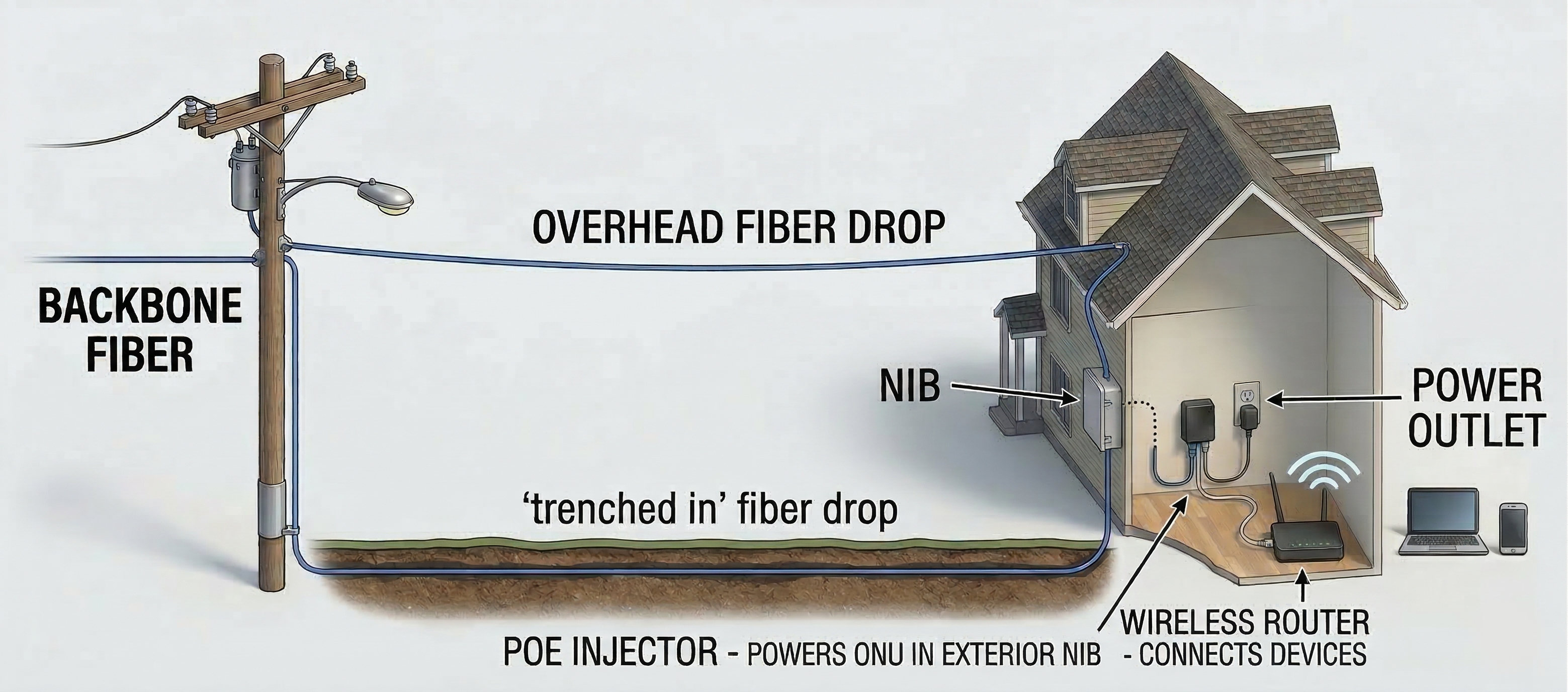
Image shows an average installation.
Will fiber optic internet improve my cell phone reception?
Not directly, because cell signals and home internet use different networks. However, our fiber internet provides incredibly fast, reliable Wi-Fi. If you have bad cell reception at home, you can easily bypass it by turning on "Wi-Fi Calling" in your phone's settings to make crystal-clear calls over your new internet connection!
How does wireless internet work?
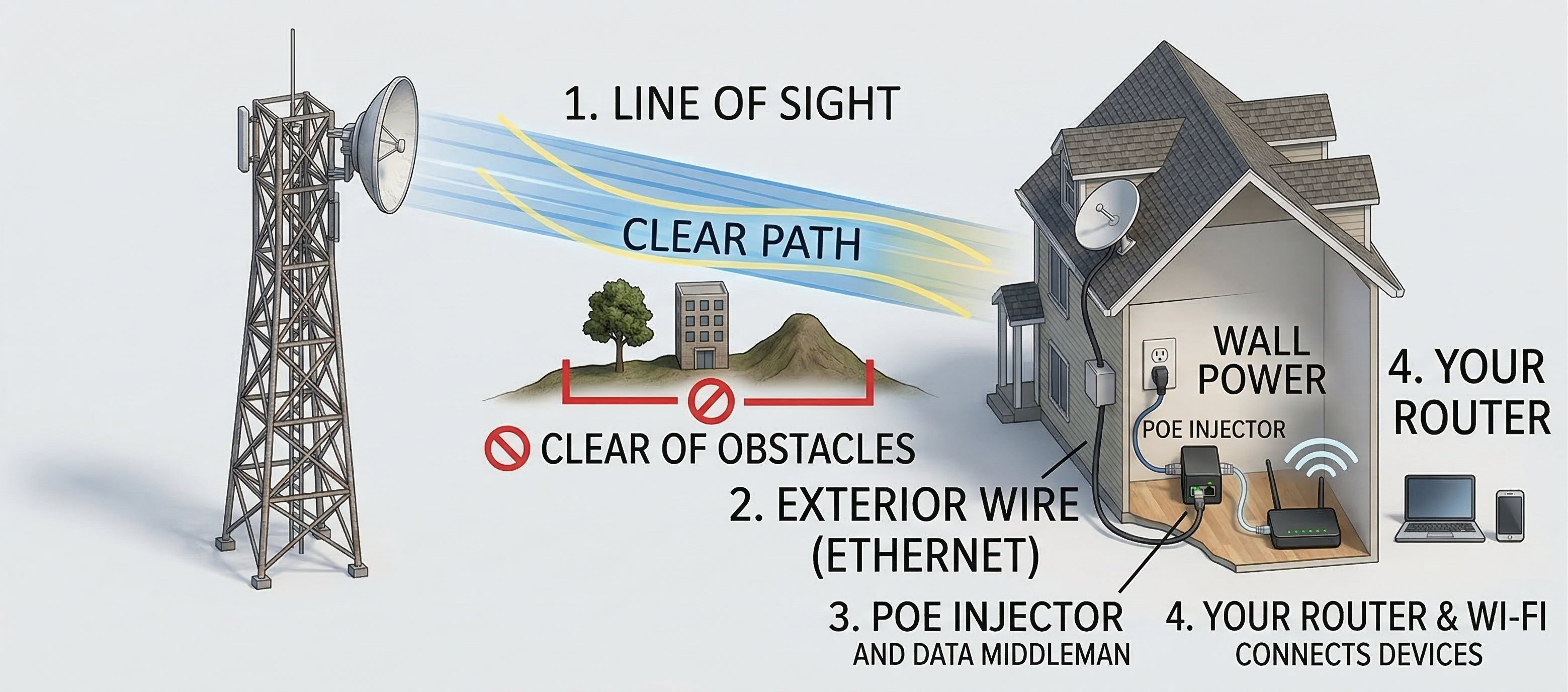
Our wireless broadband uses fixed-point technology to deliver internet to your location. A small antenna mounted on your property connects to our nearest tower, providing reliable high-speed internet without the need for cable or fiber lines.
How much data do I have? Will I run out?
FlexiNET does not meter bandwidth. All our packages come with unlimited data usage — no caps, no overage charges, no throttling.
Whether you stream HD video, work from home, game online, or have multiple users connected at once, you will never run out of data or see your speeds reduced.
What to do if you are having trouble getting online? (Wireless)
If you have wireless internet service and are having trouble connecting, we recommend power cycling your router and FlexiNET radio. Follow these steps:
1) Unplug the POE Adaptor from the electrical outlet.
2) Wait 30 seconds.
3) Plug the POE Adaptor back into the outlet.
4) The radio should power up and reconnect within 30–45 seconds.
5) To power cycle your router, follow the same steps using your router's power cord instead of the POE.
If you are still having issues after power cycling, please contact our support team.
What to do if I am having trouble getting online? (Fiber)
Important: Do NOT disconnect or otherwise directly handle the fiber cable! Call FlexiNET support if you are having issues with your fiber connection.
If you have fiber internet service and are having trouble connecting, try these troubleshooting steps:
1) Power cycle your router by unplugging it from the electrical outlet, waiting 30 seconds, and plugging it back in. Wait a minute and test your connection. If the issue persists, continue to step 2.
2) Power cycle the ONU (Optical Network Unit) connected to your fiber line. If your fiber is powered by POE, unplug the POE adaptor for 30 seconds and plug it back in. The unit should reconnect within 30–45 seconds. Wait a minute and test your connection. If the issue persists, continue to step 3.
3) Power cycle your router again by unplugging it for 30 seconds and plugging it back in.
If you are still having issues, please contact our support team.
What if I need to move FlexiNET equipment for renovations or other reasons?
Please call FlexiNET before removing, relocating, or making any changes to your equipment! Our technicians have specialized tools and training to safely handle and reposition equipment without causing damage.
Wireless antennas must be precisely aligned to the nearest tower to maintain a strong, reliable connection. Even a small bump or shift can significantly degrade your signal quality and internet speed. Our team will ensure your antenna is realigned and tested after any work is completed.
Fiber optic cables are extremely delicate and expensive to repair or replace. Bending, pulling, or cutting a fiber cable can interrupt service for not just your home, but potentially your entire neighborhood. Only qualified FlexiNET technicians should handle fiber infrastructure.
To avoid service interruptions or costly repairs, please contact us before starting any renovation, construction, or landscaping work that may affect your equipment or cables. We are happy to help plan around your equipment to keep your service running smoothly.